MERN Backend Practice
Yubin, Hsu
TSID / NTAD
Outline
- Create the backend project
- MongoDB support
- Implement the API
- Define API routes as a plugin
- Define response schema
- Jest
- Serve frontend code
Create the backend project
- create project folder
mkdir myMernProject
cd myMernProject
- create backend project
mkdir backend
cd backend
npm init
- Install dependencies of backend project
npm i fastify pino-pretty dotenv
npm i -D typescript @types/node
npx tsc --init
edit backend/tsconfig.json
"include": ["src/**/*.ts"],
"exclude": ["node_modules"],

"compilerOptions": {
  "outDir": "./dist",
  "rootDir": "./src",
}
create backend/.env
FASTIFY_PORT=8888
create backend/src/server.ts
import fastify, { FastifyInstance } from 'fastify'

export const serverOf: () => FastifyInstance = () => {
 const server = fastify({
  logger: {
    transport: {
      target: 'pino-pretty'
    },
    level: 'debug'
  }
 })

 server.get('/ping', async (request, reply) => {
    return reply.status(200).send({ msg: 'pong' })
 })

 return server

}

export const serverStart: (port: number) => (server: FastifyInstance) => Promise<FastifyInstance> = (port) => async (server) => {
  const listenAddress = '0.0.0.0'
  const fastifyConfig = {
    port: port,
    host: listenAddress
  }

  await server.listen(fastifyConfig)

  return server
}
create backend/src/index.ts
import { serverOf, serverStart } from './server'
import * as dotenv from 'dotenv'

dotenv.config()
const port = parseInt(process.env.FASTIFY_PORT || '8888')

const server = serverOf()

serverStart(port)(server)
  .then(() => {
    console.log(`Server start successfully`)
  })
  .catch((error) => {
    console.log(`Failed to start server: ${error}`)
  })
build and run
- build with tsc
tsc
- run with node
node dist/index.js
Define custom npm scripts
- edit backend/package.json
"scripts": {
  "build": "tsc",
  "start": "node dist/index.js"
},
Use custom npm script
npm run build
npm run start
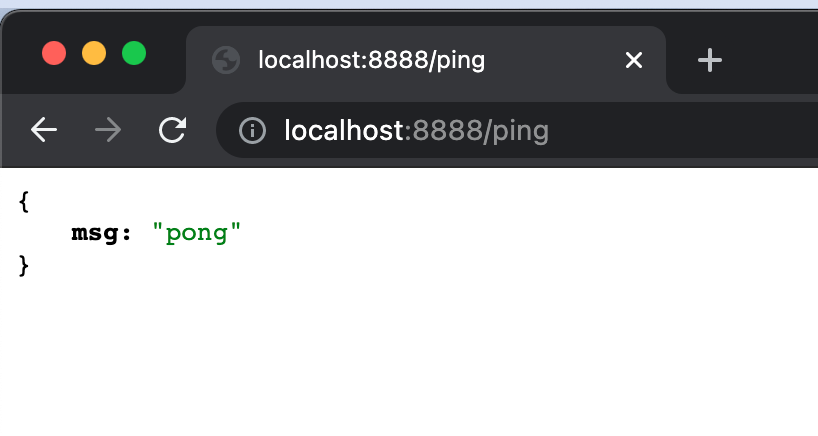
visit the endpoint
API client
- Postman
- curl
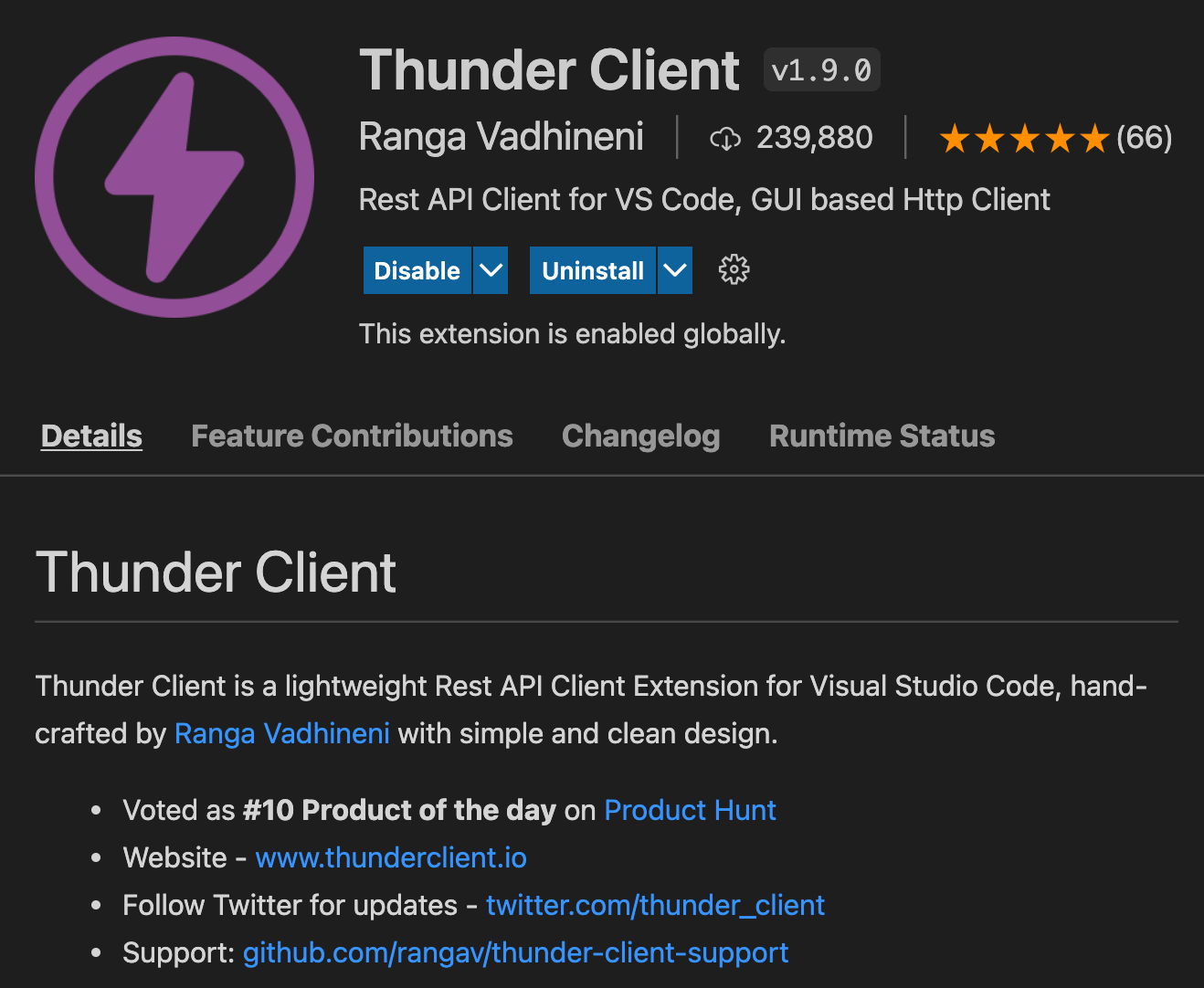
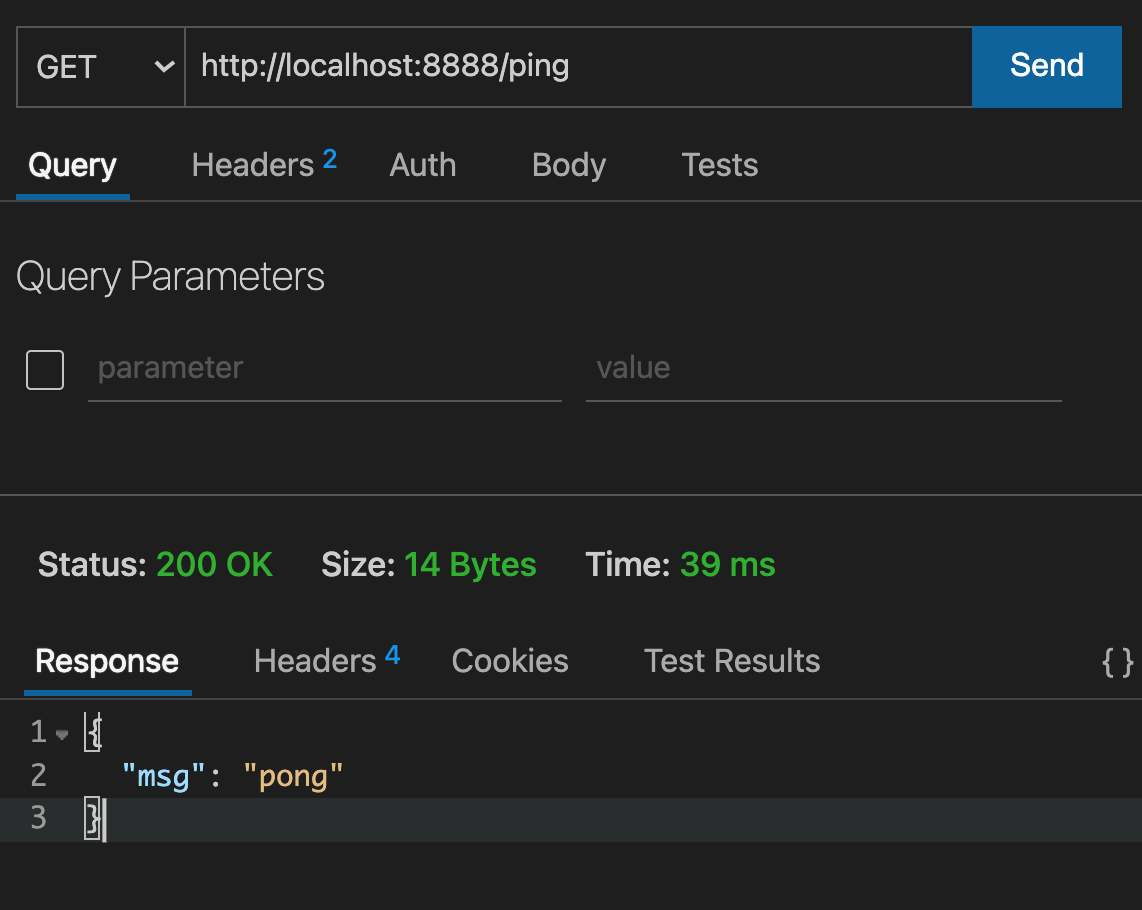
- Thunder Client (vscode extension)
- REST Client (vscode extension)
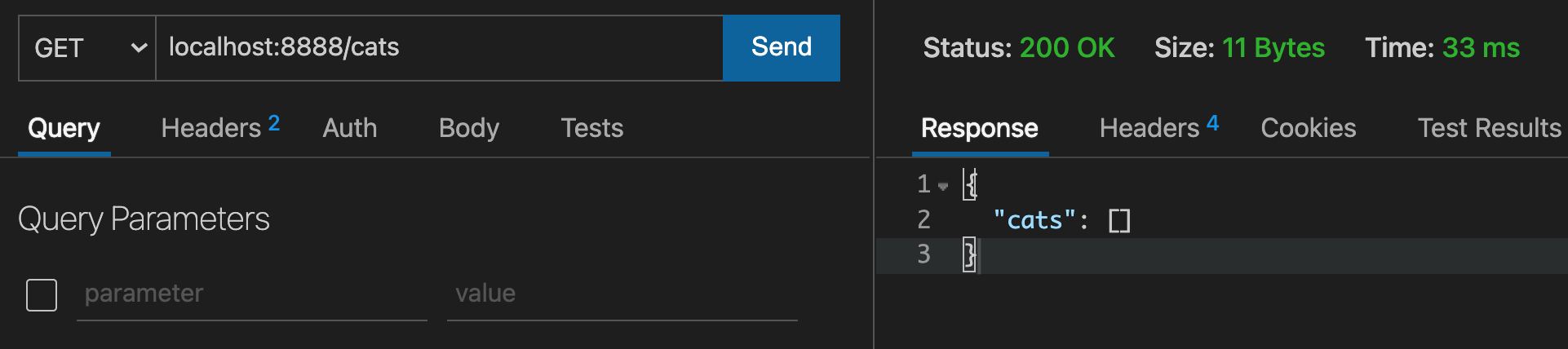
Thunder Client
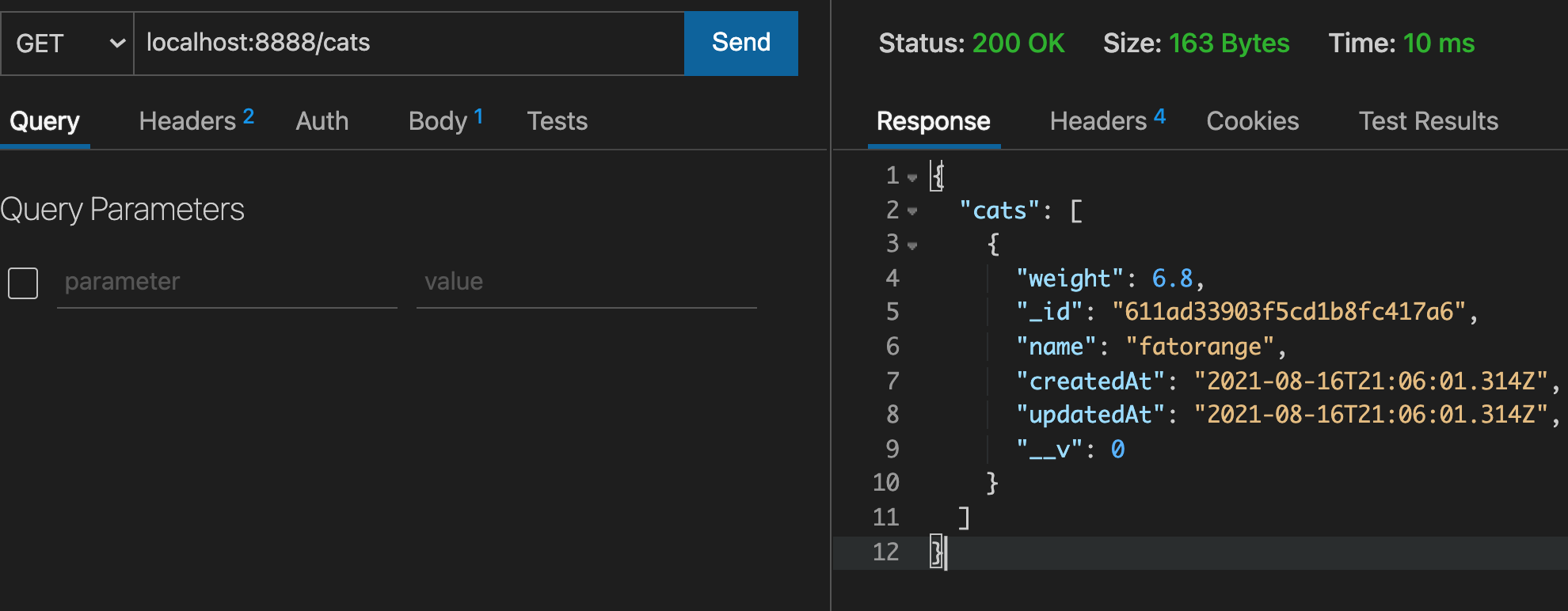
Send request by Thunder Client
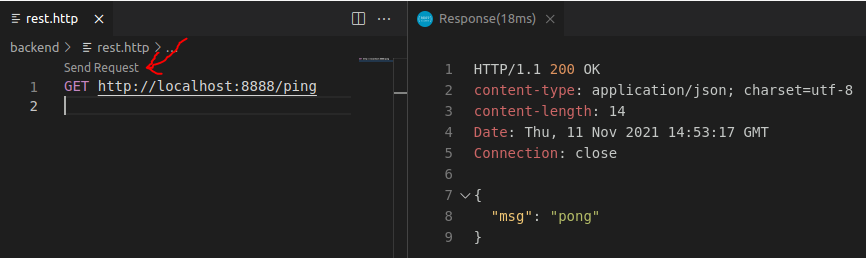
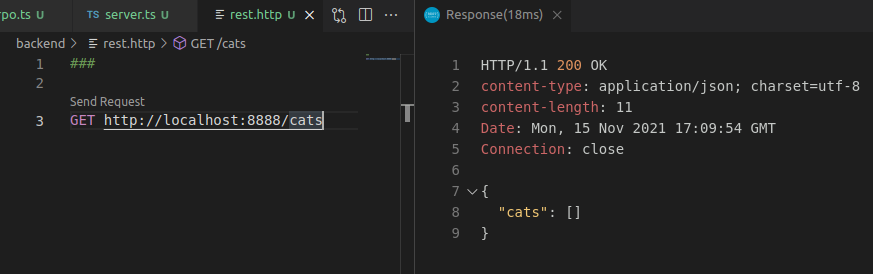
REST Client
Send request by REST Client
create a .http file, send request
prettier
install prettier
npm i -D prettier
add backend/.prettierrc.json
{
  "semi": false,
  "singleQuote": true,
  "printWidth": 120,
  "trailingComma": "none",
  "arrowParens": "always"
}
- add the script in package.json
"fix-prettier": "prettier --write \"./src/**/*.ts\""
- format code by prettier
npm run fix-prettier
Rebuild automatically when the code is changed
- install concurrently and nodemon
npm i -D concurrently nodemon
- add the script in package.json
"dev": "concurrently \"tsc -w \" \"nodemon dist/index.js\""
- run the script
npm run dev
create .gitignore
node_modules
dist
.env
get more .gitignore example
Add mongo support
Start a mongodb server
- using docker
docker run -d -p 27017:27017 mongo
- or binary
./mongod.exe
Install mongoose
npm i mongoose
MongoDB Connection String
mongodb://[username:password@]host1[:port1][,...hostN[:portN]][/[defaultauthdb][?options]]
https://docs.mongodb.com/manual/reference/connection-string/
Connection String Example
mongodb://mongodb0.example.com:27017
mongodb://myDBReader:D1fficultP%40ssw0rd@mongodb0.example.com:27017/?authSource=admin
Add env variables in backend/.env
MONGO_CONNECTION_STRING=mongodb://localhost:27017/myMERN
Create backend/src/plugins/mongoose.ts
import mongoose from 'mongoose'

const establishConnection = (connectionString: string) => {
  mongoose.connect(connectionString, (error) => {
    if (error) {
      console.log(`Error in DB connection: ${error}`)
    } else {
      console.log(`MongoDB connection successful`)
    }
  })
}
export { establishConnection }
Edit backend/src/server.ts
import { establishConnection } from './plugins/mongoose'

// ...

await server.listen(fastifyConfig)

const connectionString = process.env.MONGO_CONNECTION_STRING || 'mongodb://localhost:27017/myMERN'
await establishConnection(connectionString)

// ...
Start server
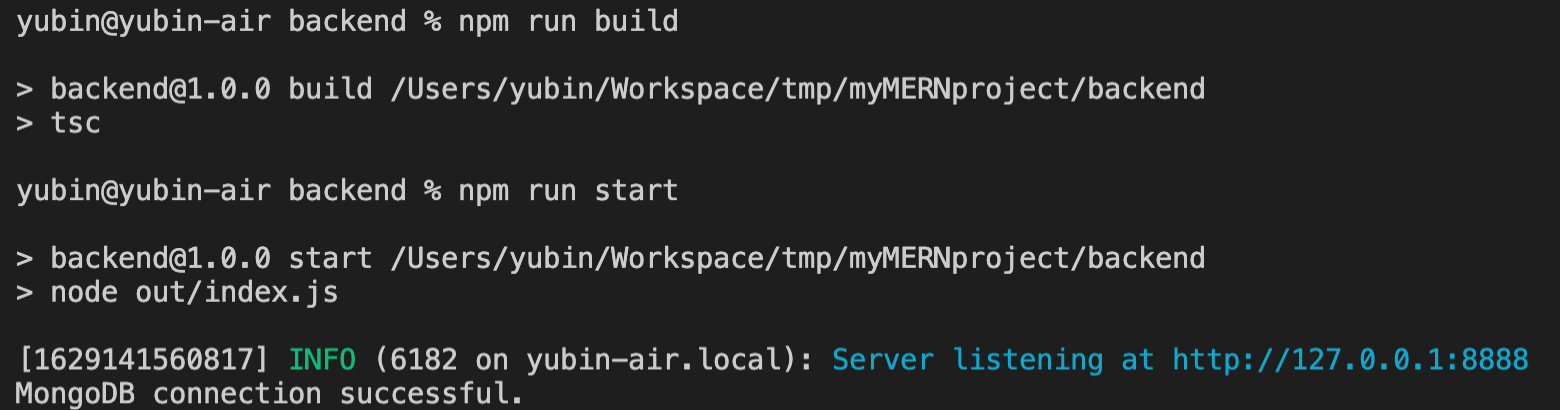
MongoDB connection successful
Add mongo schema
Define interface
create backend/src/types/cat.ts
export type Cat = {
    name: string
    weight: number
}
Add mongo schema
create backend/src/models/cat.ts
import mongoose, { model, Schema } from 'mongoose'
import { Cat } from '../types/cat'

const catSchema: Schema = new Schema(
    {
        name: {
            type: String,
            required: true
        },
        weight: {
            type: Number,
            default: 0
        }
    },
    {
        timestamps: true
    }
)

export default mongoose.models.Cat || model<Cat>('Cat', catSchema)
https://mongoosejs.com/docs/guide.html https://mongoosejs.com/docs/schematypes.html
Get Cats
Add Cat Repo
create backend/src/repo/cat.ts
import { Cat } from '../types/cat'
import CatModel from '../models/cat'

export const getCats: () => Promise<Array<ICat>> = () => CatModel.find({})
Add API endpoint
edit backend/src/server.ts
- GET /cats
import { CatRepoImpl } from './repo/cat'
// ...
server.get('/cats', async (request, reply) => {
  const catRepo = CatRepoImpl.of()
  try {
    const cats = await catRepo.getCats()
    return reply.status(200).send({ cats })
  } catch (error) {
    return reply.status(500).send({ msg: `Internal Server Error: ${error}` })
  }
})
- send GET request (by Thunder Client)
- send GET request (by REST Client)
Add Cat
edit backend/src/repo/cat.ts
import { Cat } from './../types/cat'
import CatModel from './../models/cat'

export const getCats: () => Promise<Array<ICat>> = () => Cat.find({})

export const addCat: (catBody: ICat) => Promise<ICat> = (catBody) => Cat.create(catBody)
Add API endpoint
edit backend/src/server.ts
- POST /cats
import { Cat } from './types/cat'
// ...
server.post('/cats', async (request, reply) => {
  try {
    const catBody = request.body as ICat
    const cat = await addCat(catBody)
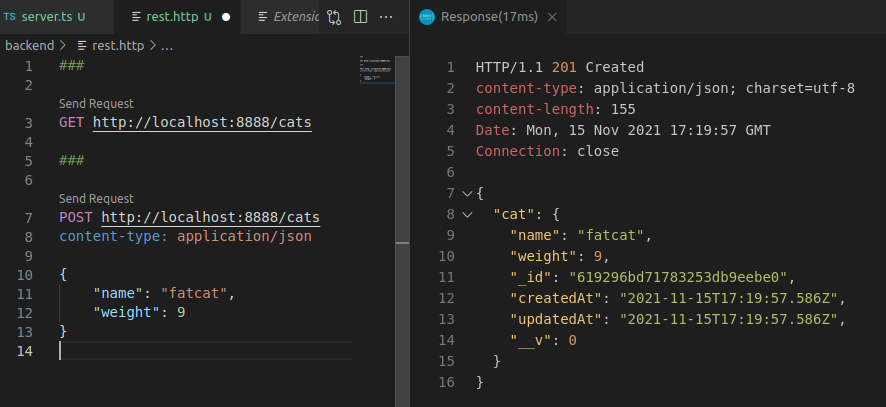
    return reply.status(201).send({ cat })
  } catch (error) {
    return reply.status(500).send({ msg: `Internal Server Error: ${error}` })
  }
})
Send POST request (by Thunder Client)

Get /cats again
Send POST request (by REST Client)
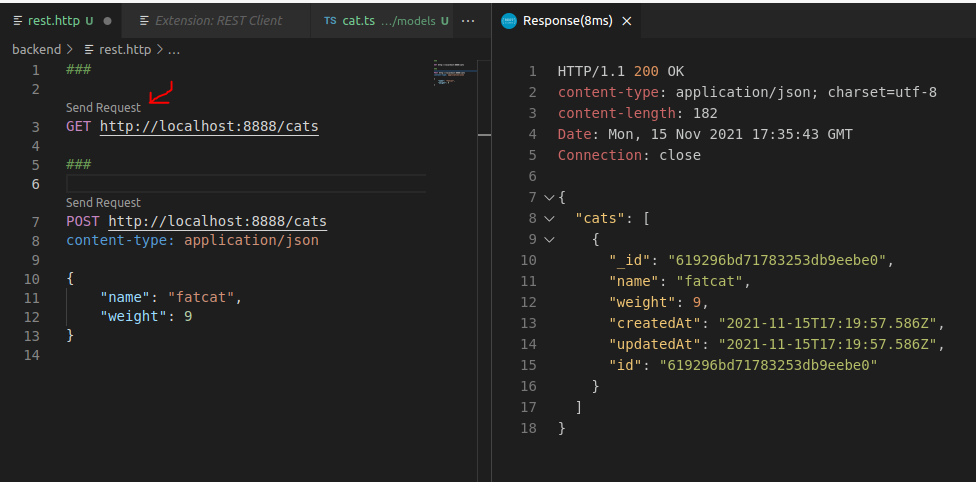
Get /cats again

Add id and remove __v for the mongoose schema
edit backend/src/models/cat.ts
catSchema.set('toJSON', {
    virtuals: true,
    versionKey: false,
})
https://mongoosejs.com/docs/tutorials/virtuals.html#virtuals-in-json
Get /cats again
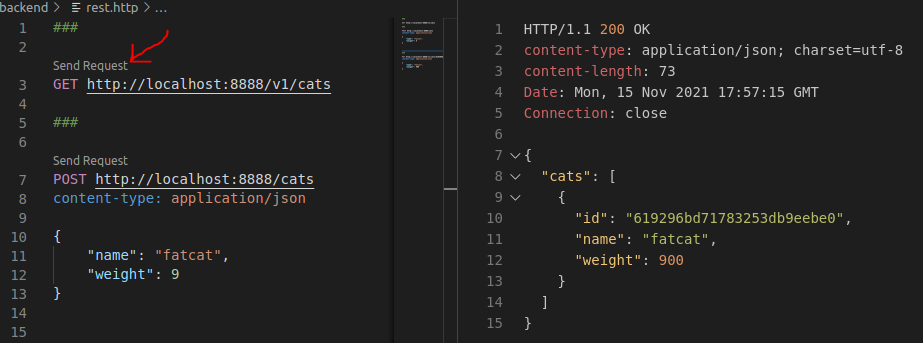
Define API routes as a plugin
ref: https://www.fastify.io/docs/latest/Reference/Plugins/#create-a-plugin
create backend/src/routes/cat.ts
move API from server.ts to this file
import { FastifyInstance, RouteShorthandOptions, FastifyReply } from 'fastify'
import { ICat } from '../types/cat'
import { CatRepoImpl } from '../repo/cat-repo'

const CatRouter = (server: FastifyInstance, opts: RouteShorthandOptions, done: (error?: Error) => void) => {

    server.get('/cats', async (request, reply) => {
        const catRepo = CatRepoImpl.of()
        try {
            const cats = await catRepo.getCats()
            return reply.status(200).send({ cats })
        } catch (error) {
            return reply.status(500).send({ msg: `Internal Server Error: ${error}` })
        }
    })

    server.post<{ Body: ICat }>('/cats', async (request, reply) => {
        const catRepo = CatRepoImpl.of()
        try {
            const catBody = request.body
            const cat = await catRepo.addCat(catBody)
            return reply.status(201).send({ cat })
        } catch (error) {
            return reply.status(500).send({ msg: `Internal Server Error: ${error}` })
        }
    })


    done()
}

export { CatRouter }
register CatRouter
edit backend/src/server.ts
server.register(CatRouter, { prefix: "/v1" });

DIY: implement update and delete API
url parameter
PUT /cats/:id
server.put('/cats/:id', async (request, reply) => {
  const id = request.params.id
  // ...
})

interface IdParams {
    id: string
}
server.put<{ Params: IdParams }>('/cats/:id', async (request, reply) => {
  const id = request.params.id
  // ...
})
Update Cat
edit backend/src/repo/cat-repo.ts
async updateCat(id: String, catBody: ICat): Promise<ICat | null> {
  return Cat.findByIdAndUpdate(id, catBody, { new: true })
}
ref: https://mongoosejs.com/docs/api.html#model_Model.findByIdAndUpdate
Add API endpoint
PUT /cats/:id
server.put<{ Params: IdParams; Body: ICat }>('/cats/:id', async (request, reply) => {
  const catRepo = CatRepoImpl.of()
  try {
    const catBody = request.body
    const id = request.params.id
    const cat = await catRepo.updateCat(id, catBody)
    return reply.status(200).send({ cat })
  } catch (error) {
    return reply.status(500).send({ msg: error })
  }
})
if id not found
const cat = await catRepo.updateCat(id, catBody)
if (cat) {
    return reply.status(200).send({ cat })
} else {
    return reply.status(404).send({msg: `Cat #${id} Not Found`})
}
if id is invalid
import { Types } from 'mongoose'

const id = request.params.id
if (!Types.ObjectId.isValid(id)) {
    return reply.status(400).send({msg: `Invalid id`})
}
server.put<{ Params: IdParams; Body: ICat }>('/cats/:id', async (request, reply) => {
  const catRepo = CatRepoImpl.of()
  try {
    const catBody = request.body
    const id = request.params.id
    if (!Types.ObjectId.isValid(id)) {
        return reply.status(400).send({msg: `Invalid id`})
    }
    const cat = await catRepo.updateCat(id, catBody)
    if (cat) {
        return reply.status(200).send({ cat })
    } else {
        return reply.status(404).send({msg: `Cat #${id} Not Found`})
    }
  } catch (error) {
    return reply.status(500).send({ msg: error })
  }
})
Delete Cat
edit backend/src/repo/cat-repo.ts
async deleteCat(id: string): Promise<ICat | null> {
  return Cat.findByIdAndDelete(id)
}
ref: https://mongoosejs.com/docs/api.html#model_Model.findByIdAndDelete
Add API endpoint
DELETE /cats/:id
server.delete<{ Params: IdParams }>('/cats/:id', async (request, reply) => {
  const catRepo = CatRepoImpl.of()
  try {
    const id = request.params.id
    if (!Types.ObjectId.isValid(id)) {
      return reply.status(400).send({ msg: `Invalid id` })
    }
    const cat = await catRepo.deleteCat(id)
    if (cat) {
      return reply.status(204).send()
    } else {
      return reply.status(404).send({ msg: `Cat #${id} Not Found` })
    }
  } catch (error) {
    return reply.status(500).send({ msg: error })
  }
})
DIY: Implement get one cat by id
- GET /cats/:id
Validation
defined request schema
support: body, querystring, params, headers
const bodySchema = {
  type: 'object',
  required: ['name', 'status'],
  properties: {
    name: { type: 'string' },
    description: { type: 'string' },
    status: { type: 'boolean' }
  }
}
const postOptions = { ...opts, schema: { body: bodySchema } }

server.post('/todos', postOptions, async (request, reply) => {
  // ...
})

Define response schema
typebox
npm i @sinclair/typebox
edit backend/src/routes/cat.ts
import { Type, Static } from '@sinclair/typebox'
// ...
// in CatRouter
const CatsResponse = Type.Object({
  cats: Type.Array(
    Type.Object({
      id: Type.String(),
      name: Type.String(),
      weight: Type.Number()
    })
  )
})
type CatsResponse = Static<typeof CatsResponse>

const catsResponseOptions =  { ...opts, schema: { response: { 200: CatsResponse } } }

// put opts at the second parameter
server.get('/cats', catsResponseOptions, async (request, reply) => {
  const catRepo = CatRepoImpl.of()
  try {
    const cats = await catRepo.getCats()
    return reply.status(200).send({ cats })
  } catch (error) {
    return reply.status(500).send({ msg: 'Internal Server Error' })
  }
})
Get the response schema as defined
difference schemas based on difference status code
const CatsResponse = {
  cats: Type.Array(
    Type.Object({
      id: Type.String(),
      name: Type.String(),
      weight: Type.Number()
    })
  )
}
type CatsResponse = Static<typeof CatsResponse>

const CatResponse = {
  cat: Type.Object({
    id: Type.String(),
    name: Type.String(),
    weight: Type.Number()
  })
}
type CatResponse = Static<typeof CatResponse>

opts = { ...opts, schema: { response: { 200: CatsResponse, 201: CatResponse } } }

server.get('/cats', opts, async (request, reply) => {
  const catRepo = CatRepoImpl.of()
  try {
    const cats = await catRepo.getCats()
    return reply.status(200).send({ cats })
  } catch (error) {
    return reply.status(500).send({ msg: `Internal Server Error: ${error}` })
  }
})

server.post('/cats', opts, async (request, reply) => {
  const catRepo = CatRepoImpl.of()
  try {
    const catBody = request.body as ICat
    const cat = await catRepo.addCat(catBody)
    return reply.status(201).send({ cat })
  } catch (error) {
    return reply.status(500).send({ msg: `Internal Server Error: ${error}` })
  }
})
Jest
Jest
- JavaScript testing framework
- Open Source lead by Facebook
- https://github.com/facebook/jest
- https://jestjs.io/
Setup jest
npm i -D jest ts-jest @types/jest
- jest - JavaScript testing framework
- ts-jest - TypeScript preprocessor for jest
- @types/jest - type definition for jest
Jest config
https://jestjs.io/docs/configuration
create backend/jest.config.js
module.exports = {
  preset: "ts-jest",
  transform: {
    "^.+\\.(t|j)sx?$": "ts-jest",
  },
  testEnvironment: "node",
  moduleFileExtensions: ["ts", "tsx", "js", "jsx", "json", "node"],
  testTimeout: 20000,
  testPathIgnorePatterns: ["/node_modules/", "/out/"],
};
npm scripts
backend/package.json
"scripts": {
  "test": "jest --verbose --coverage --runInBand",
  "build": "tsc",
  "start": "node out/index.js"
}
Create test case
Create src/tests/server.spec.ts
import { FastifyInstance } from 'fastify'
import { startFastify } from '../server'

describe('Server test', () => {
    let server: FastifyInstance

    beforeAll(async () => {
        server = startFastify(8888)
        await server.ready()
    })

    afterAll(async () => {
        try {
            await server.close()
            console.log('Closing Fastify server is done!')
        } catch (e) {
            console.log(`Failed to close a Fastify server, reason: ${e}`)
        }
    })

    it('should successfully get a pong string', async () => {
        const response = await server.inject({ method: 'GET', url: '/ping' })

        expect(response.statusCode).toBe(200)
        expect(response.body).toStrictEqual(JSON.stringify({ msg: 'pong' }))
    })
})
Not connect to dev database when runnning test case
update backend/src/server.ts
if (process.env.NODE_ENV !== 'test') {
  establishConnection(connectionString)
}
Run test
npm run test
describe & it
describe("Server test", () => {
  it("should successfully get a pong string", () => {
    // Some testing condition
  });
});
describe("API test", () => {
  it("should successfully get a pong string", () => {
    // Some testing condition
  });
  it("test B", () => {});
  it("test C", () => {});
  it("test D", () => {});
});
expect
expect(response.statusCode).toBe(200);
expect(response.body).toStrictEqual(JSON.stringify({ msg: "pong" }));
- toBe() - to compare primitive values or to check referential identity of object instances
- toStrictEqual() - to test that objects have the same types as well as structure
expect(1 + 2).toBeLessThan(4);
expect(1 + 2).toBeLessThanOrEqual(3);
expect(["A", "B", "C"]).toContain("B");
expect(1 + 2).not.toBe(4);
Synchronous
describe("Math test", () => {
  it("1 + 2 should be 3", () => {
    const a = 1;
    const b = 2;
    expect(a + b).toBe(3);
  });
});
Asynchronous
// pong.ts
async getPong(): Promise<string> {
    return new Promise((resolve) => {
        resolve('pong')
    })
}

// pong.spec.ts
describe('asynchronous test', () => {
    it('get pong', async () => {
        const result = await pong.getPong()
        expect(result).toBe('pong')
    })
    it('still get pong', async () => {
        await expect(pong.getPong()).resolves.toBe('pong')
    })
})
Testing database
mongodb-memory-server
Install mongodb-memory-server
npm i -D mongodb-memory-server
Create src/tests/db.ts
import mongoose from 'mongoose'
import { MongoMemoryServer } from 'mongodb-memory-server'

const mongod = new MongoMemoryServer()

/**
 * Connect to mock memory db.
 */
export const connect = async () => {
    await mongod.start()
    const uri = mongod.getUri()
    await mongoose.connect(uri)
}

/**
 * Close db connection
 */
export const closeDatabase = async () => {
    await mongoose.connection.dropDatabase()
    await mongoose.connection.close()
    await mongod.stop()
}

/**
 * Delete db collections
 */
export const clearDatabase = async () => {
    const collections = mongoose.connection.collections
    for (const key in collections) {
        const collection = collections[key]
        await collection.deleteMany({})
    }
}
API Test
(using mongodb-memory-server)
create backend/tests/cat.spec.ts
import { FastifyInstance } from 'fastify'
import { startFastify } from '../server'
import * as dbHandler from './db'
import { ICat } from '../types/cat'

describe('Cat API test', () => {
  let server: FastifyInstance
  const fastifyPort = 8888

  beforeAll(async () => {
    await dbHandler.connect()
    server = startFastify(fastifyPort)
    await server.ready()
  })

  afterEach(async () => {
    await dbHandler.clearDatabase()
  })

  afterAll(async () => {
    await dbHandler.closeDatabase()
    await server.close()
    console.log('Closing Fastify server is done!')
  })

  it('should successfully get a empty list of cats', async () => {
    const response = await server.inject({ method: 'GET', url: '/api/cats' })

    expect(response.statusCode).toBe(200)
    expect(response.body).toStrictEqual(JSON.stringify({ cats: [] }))
  })

  it('should successfully post a cat to mongodb', async () => {
    const response = await server.inject({
      method: 'POST',
      url: '/api/cats',
      payload: {
        name: 'fat cat',
        weight: 6.8
      }
    })

    expect(response.statusCode).toBe(201)
    const cat: ICat = JSON.parse(response.body)['cat']
    expect(cat.name).toBe('fat cat')
    expect(cat.weight).toBe(6.8)

  })

})
Testing database
Testcontainers-mongoose
https://github.com/yubinTW/testcontainers-mongoose
npm i -D testcontainers-mongoose
API Test
(using testcontainers-mongoose)
create backend/tests/cat.spec.ts
import { FastifyInstance } from 'fastify'
import { startFastify } from '../server'
import * as dbHandler from 'testcontainers-mongoose'
import { ICat } from '../types/cat'

describe('Cat API test', () => {
  let server: FastifyInstance
  const fastifyPort = 8888

  beforeAll(async () => {
    await dbHandler.connect('harbor.yourcompany.com/mongo:4.4.4')
    server = startFastify(fastifyPort)
    await server.ready()
  })

  afterEach(async () => {
    await dbHandler.clearDatabase()
  })

  afterAll(async () => {
    await dbHandler.closeDatabase()
    await server.close()
    console.log('Closing Fastify server is done!')
  })

  it('should successfully get a empty list of cats', async () => {
    const response = await server.inject({ method: 'GET', url: '/api/cats' })

    expect(response.statusCode).toBe(200)
    expect(response.body).toStrictEqual(JSON.stringify({ cats: [] }))
  })

  it('should successfully post a cat to mongodb', async () => {
    const response = await server.inject({
      method: 'POST',
      url: '/api/cats',
      payload: {
        name: 'fat cat',
        weight: 6.8
      }
    })

    expect(response.statusCode).toBe(201)
    const cat: ICat = JSON.parse(response.body)['cat']
    expect(cat.name).toBe('fat cat')
    expect(cat.weight).toBe(6.8)

  })

})
Deployment Strategy
MERN Arch.
- Frontend
- React
- Backend
- Fastify
- Database
- MongoDB

React build static files
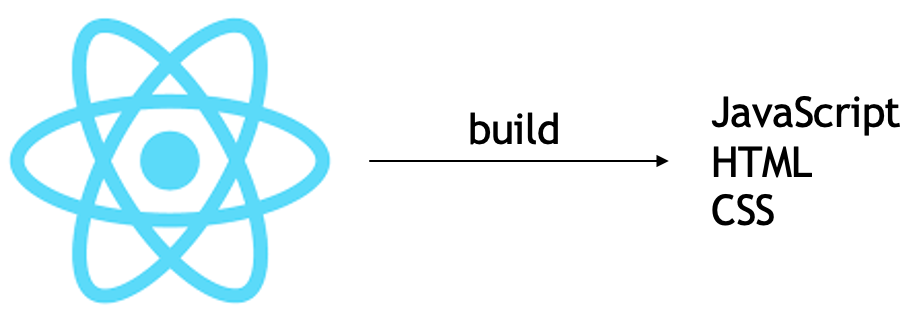
Who serve the static files ?
- Frontend Server ?
- Backend Server ?
Frontend Server
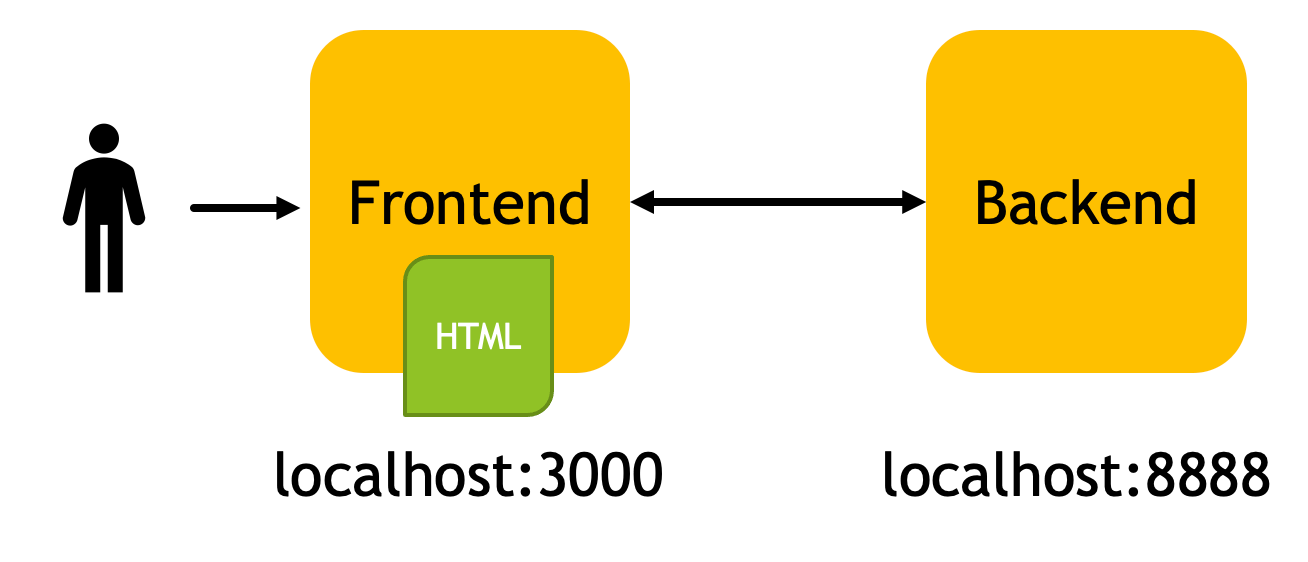
- CORS issue
- User can visit website even when the backend server is down
CORS
@fastify/cors
cd backend
npm i @fastify/cors
register in backend/src/server.ts
import fastifyCors from '@fastify/cors'
// ...
server.register(fastifyCors, {})
Backend Server
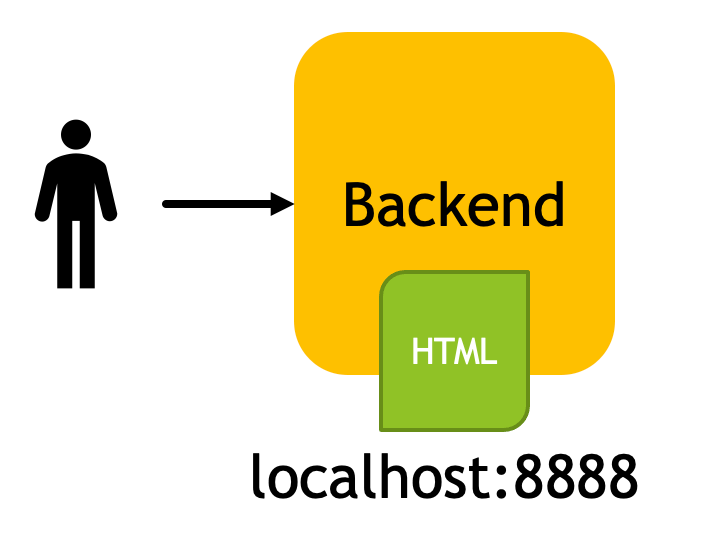
@fastify/static plugin
cd backend
npm i @fastify/static
register in backend/src/server.ts
import fastifyStatic from '@fastify/static'
import path from 'path'
// ...
server.register(fastifyStatic, {
  root: path.join(__dirname, '../../frontend/build'),
  prefix: '/'
})
build frontend code
cd frontend
npm run build
start backend server
cd backend
npm run build
npm run start
end